
First
What it does not do
The limitations, before the pitch. Most of these are deliberate; all of them are real.
Those are not a roadmap. A tool that stays inside your browser's sync storage cannot hold images, and one with no server cannot offer sharing. The constraints come from the architecture, and the architecture is the point — it is what removes the account, the server, and the subscription.
If any single item in that list is something you rely on, the honest recommendation is to stay where you are. Keep and OneNote are good products, and both have free tiers.
The case
What people actually use Keep for
Full notes suites are built for the union of everything anyone might want. Most individuals use a narrow slice of that, and for a large number of people the slice looks like this:
- A few lines about a page they are looking at.
- A quote from an article, pasted in so it is not lost.
- A link plus a sentence explaining why it was worth keeping.
- A reminder about a specific site — which account, which price, which contact.
Every one of those is a note about a web page. And in a general notes app, every one of them requires the same manual ritual: copy the text, switch app, paste, switch back, copy the URL, switch app again, paste. The address is the part that gets dropped, because it is the third trip.
That is the whole gap. Not that Keep is bad at notes — it is that a general notes app has no concept of the page you were on, so the connection has to be rebuilt by hand every time.
Side by side
The comparison
Structural differences only. Feature tiers and pricing at the three suites change regularly, so this compares how the tools are built rather than what any current plan includes.
| Keep / OneNote / Evernote | NotePin | |
|---|---|---|
| Account required | Yes | No |
| Where notes are stored | The vendor's servers | Your browser profile |
| Sync mechanism | The vendor's sync | Your browser's own sync |
| Rich text, images, attachments | Yes | No — plain text only |
| Mobile apps | Yes | No — desktop browser only |
| Sharing and collaboration | Yes | No |
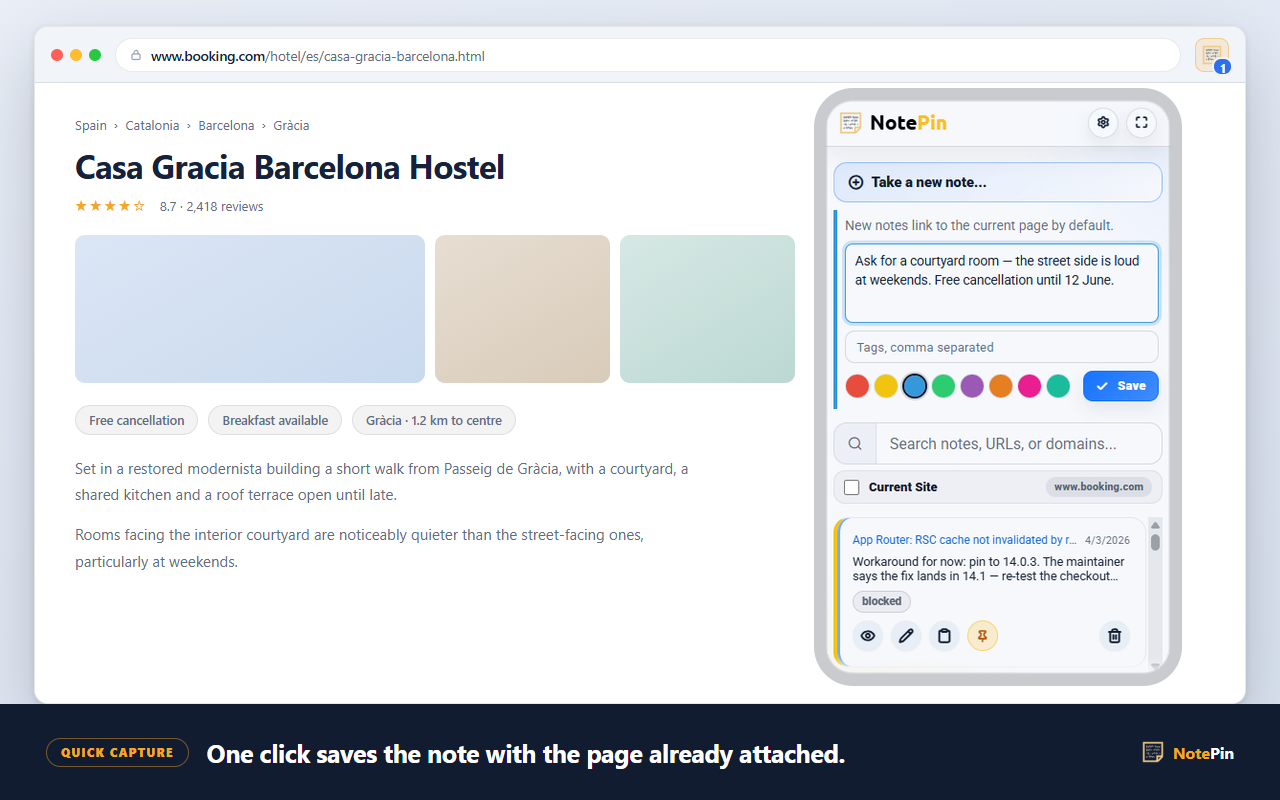
| Page address attached automatically | No — paste it yourself | Yes |
| Notes grouped by website | No | Yes, automatically |
| Count of notes for the current site | No | Yes, on the toolbar icon |
| Notes shown on the site itself | No | Optional — sticky notes |
| Practical size | Very large | About 250–300 notes |
| Export | Varies by product | JSON, Markdown, CSV |
Rows one to six favour the suites. Rows seven to ten are things they structurally cannot do, because a general notes app does not know what page your browser is on. That is the trade, and which side wins depends entirely on which rows describe your actual use.
Architecture
No account, no server
There is no NotePin server. This is a factual statement about the architecture, not a privacy promise.
Notes live in your browser profile. Syncing between your own machines uses your browser's own sync — the same mechanism that already carries your bookmarks — so a note travels from your desktop to your laptop the way a bookmark does, without passing through anything of ours.
- No sign-up, no email address, no password.
- No analytics inside the extension.
- No note data is sent to third parties.
- Nothing to delete from a server if you uninstall, because nothing was on one.
The permissions are correspondingly small: storage, activeTab,
contextMenus, and scripting. Website access is requested only if you
switch on in-page sticky notes, never at install. Full detail is on the
privacy page.
Cost
Free, with nothing above it
NotePin is free, and there is no paid tier — no pro version, no device limit, no note cap beyond the storage ceiling described above, and no feature held back.
This is worth stating plainly because "free note taking app" usually means a free tier underneath a paid one, where the free tier's limits are set by what makes upgrading feel necessary. There is no upgrade here, so the limits on this page are the real ones — set by browser sync storage, not by pricing strategy.
What that also means: there is no revenue funding a large roadmap. NotePin is a small tool by FixQuotes and is likely to stay one.
Practicalities
Moving in and out
Coming from Keep, OneNote, or Evernote
In practice this matters less than it sounds, because the two tools do different jobs. The realistic pattern is not migration but division: leave the existing archive where it is, and start using NotePin for new notes that are about specific web pages. If after a month you have not opened the old app for that kind of note, you have your answer.
Leaving
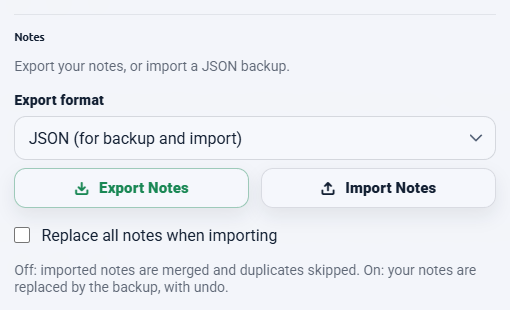
Export offers three formats. Markdown is the exit route into Obsidian, Notion, or any plain-text system. CSV goes into a spreadsheet. JSON is the only one that can be imported back, so it is the one to keep as a backup. Files are named with the date and time, and you can export just the notes you have selected using the bulk toolbar.
The asymmetry is deliberate and worth naming: you cannot bring a collection in, but you can always take one out.
Honest scope
Who should not switch
The clearest signal a comparison is fair is that it tells some readers to stay put.
- You take notes on your phone. There is no mobile app and no plan for one. This alone rules out a large share of Keep users.
- You need images, scans, or handwriting. OneNote is very good at this; NotePin cannot do it at all.
- You write long documents. 2,000 characters is a few paragraphs, not a chapter.
- You share notes with other people. No sharing, no collaboration, no export-to-a-colleague beyond sending them a file.
- You use reminders. Nothing here notifies you of anything.
- You have thousands of notes. The ceiling is a few hundred.
- Most of your notes are not about web pages. Then the one advantage on offer does not apply to you.
What is left, once those are excluded, is a fairly specific person: someone at a desktop browser, taking short notes about specific websites, who is tired of the copy-switch-paste ritual and does not want another account. For that person this is a better tool. For everyone else it is a worse one, and pretending otherwise would just waste an install.
 Add to Chrome — Free
 Add to Edge — Free
Answers
Common questions
What is a good free alternative to Google Keep?
It depends on which part of Keep you use. If you use it for lists, reminders, images and voice notes across phone and desktop, you want a full notes app and NotePin is not it. If you mostly use it to jot something about a web page you are looking at, NotePin is lighter and better suited: it attaches the page address automatically, needs no account, and keeps everything inside your browser.
Is there a lightweight alternative to OneNote?
OneNote is built around notebooks, sections and pages, which is a lot of structure if your notes are short and tied to websites. NotePin has no hierarchy at all — notes group themselves by the domain they were saved from, and colours and tags cut across that. It handles plain text only, up to 2,000 characters per note, so it suits short notes rather than long documents.
Does NotePin need an account?
No. There is no account, no sign-up, and no NotePin server. Notes are stored in your browser profile. Syncing between your own devices uses your browser's own sync — the same mechanism that syncs your bookmarks — so nothing passes through a server belonging to us.
Can I import my notes from another app?
Only from a NotePin JSON export. There is no importer for Keep, OneNote, or Evernote archives, so an existing collection does not transfer. Export in the other direction works to JSON, Markdown, or CSV, which means you can leave at any time even though you cannot arrive in bulk.
Where to go next
The capture flow that makes this worthwhile is covered in saving selected text. For organising a growing collection, see a better bookmark manager, and for a specific long-term use, the commonplace book guide.